Once a week I spend my lunch hour playing with the dies, inks, stains, paints, etc. in the art room at work. It is definitely one of the perks to working at a crafting company.
I have been experimenting with painting and inking a lot of tags and decided to use a couple of them to create some Halloween projects.
The Happy Halloween tag began with lots of Distress Paints and Stains in a variety of layers and techniques. Once I was happy with the look of the tag I used a thin sheet of scrap cardstock and die cut the word "Boo" using the Gothic Boo die by Sizzix. I sprayed the back lightly with adhesive to temporarily hold it in place on the tag. Next, I sprayed Perfect Pearls Heirloom Gold using the die cut shape as a stencil.
I wanted to experiment with Tim Holtz's new Framelits and Stamps so I used the Retro Halloween Set {the Owl} and Cobweb Blueprint Set {words "Happy Halloween"}. My only suggestion would be to use very dark ink if you are going to stamp on colored paper. Other than that these were super fun and easy.
Other shapes I used include the Bird Branch {I trimmed off the bird} and the Mini Owl and Crescent Moon {Moon only}. I adhered everything to the tag and love how the subtle shimmer of the Perfect Pearls makes it look like moon beams.
My next tag is a Pumpkin tag which began with a thick layer of Distress Paint so there would be brush strokes visible once it dried. I used Distress Stains and Distress Inks in a variety of Autumn colors and techniques on top of the paint. The darker colors made the texture stand out nicely.
I also splattered water to create droplets which is my favorite Tim Holtz technique.
After I was satisfied with the colors and textures of the tag I die cut the eyes using only the triangle eyes from the Sizzix Mini Scary Jack-o-Lantern Set and using the Base Tray.
The next part was an experiment that happily worked out as I had hoped. I cut the mouth by using the same Mini Scary Jack-o-Lantern die and Tray but instead of using a regular Cutting Pad, I used the Embossing Diffuser Set #2 so that I could control exactly where the die would cut.
I began with a regular Cutting Pad on the bottom, then the Base Tray with the Jack-o-Lantern mouth die only, next I placed my tag and finally an Embossing Diffuser insert piece placed over the upper part of the mouth die. I ran this through the Big Shot so that it only cut where the Embossing Diffuser insert piece was and this created a single jagged mouth cut across my tag.
To reassemble the two pieces, I tilted the bottom piece and stapled them together on one side.
As a final detail, I used Distress Inks to age a piece of green ribbon to use as a stem for my Pumpkin Tag.
This is linked to:
504 Main, Common Ground, Homework, Just Us Four, Kathe With an E, Ladybug Blessings, Mad in Crafts, Sew Much Ado, Simply Designing, Tatertots and Jello, The Crafty Blog Stalker, The DIY Dreamer and Whipperberry
Showing posts with label tag. Show all posts
Saturday, October 26, 2013
Sunday, March 25, 2012
Personalized Gift Tags
I gathered together two boxes of gifts and goodies, one for my friend and one for my sister's birthday. I wanted to make a personalized tag for each of them. I began by using some simple decorative techniques using Distress Inks and finished by embellishing with vintage/thrifted treasures.
Here are the two finished tags.
I began with two die cut Tags and applied Distress Inks in a random pattern.
The one on the left was embossed using the Leaves Textured Impressions by Sizzix. I then used an ink applicator and applied more Distress Ink to highlight the raised edges. Along the bottom I "gathered" Tissue Tape and a piece of thrifted lace, both were colored with Distress Stains. I attached a thrifted rhinestone earring, a shell button and an old metal button that says Hawaii. My friend is from Hawaii so it was the perfect embellishment.
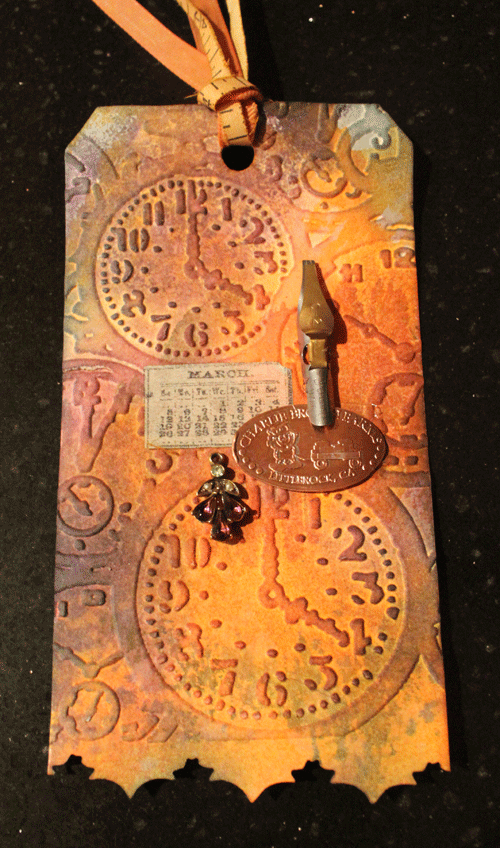
The second tag is for my sister as part of her birthday present. Because birthdays are a way of measuring time I decided to use the Pocket Watch Texture Fade to enhance her tag. I used the Ornate On The Edge die to add a decorative edge along the bottom of the tag.
I embellished the tag using several objects that remind me of my sister. First, her birthday is in March so I used a piece of the Tissue Tape that has a March calendar. Next, she collects Squished Pennies so I added one from an out-of-the-way store called Charley Brown Farms in Littlerock, CA. I'm guessing that she doesn't have a squished penny from there. She is also a good calligrapher so I attached an old pen nib that I thrifted. And to balance the design and add a little bling, I added a piece of a vintage earring.
Here are the two finished tags.
I began with two die cut Tags and applied Distress Inks in a random pattern.
The one on the left was embossed using the Leaves Textured Impressions by Sizzix. I then used an ink applicator and applied more Distress Ink to highlight the raised edges. Along the bottom I "gathered" Tissue Tape and a piece of thrifted lace, both were colored with Distress Stains. I attached a thrifted rhinestone earring, a shell button and an old metal button that says Hawaii. My friend is from Hawaii so it was the perfect embellishment.
The second tag is for my sister as part of her birthday present. Because birthdays are a way of measuring time I decided to use the Pocket Watch Texture Fade to enhance her tag. I used the Ornate On The Edge die to add a decorative edge along the bottom of the tag.
I embellished the tag using several objects that remind me of my sister. First, her birthday is in March so I used a piece of the Tissue Tape that has a March calendar. Next, she collects Squished Pennies so I added one from an out-of-the-way store called Charley Brown Farms in Littlerock, CA. I'm guessing that she doesn't have a squished penny from there. She is also a good calligrapher so I attached an old pen nib that I thrifted. And to balance the design and add a little bling, I added a piece of a vintage earring.
As a finishing touch and to keep with the "measuring" theme, I used a piece of an old fabric measuring tape as a ribbon.
I'm going to go add these to their gift boxes and get them ready to post. I hope they enjoy their tags as much as I enjoyed creating them.
Wednesday, January 26, 2011
Truly Vintage Valentine Tag
Today I Created | A truly vintage Valentine Tag
For this tag I used several vintage pieces. My favorite piece is the actual Valentine card given to me by my "boyfriend" in fourth grade. It was extra special because, printed on the card, it said "I love you" and to a nine year old girl that meant true love. At one point I had used cellophane tape to hold this card in one of my first scrapbooks. You can see the discoloration on her feet.
Behind the card I used bits of my daisy lace that I bought at a garage sale. The old red and white sticker is something that I had in my stash. The button is a recent find from an estate sale. The only pieces that are new are the ribbons and the black cardstock.
This is linked to Kard Krazy.
For this tag I used several vintage pieces. My favorite piece is the actual Valentine card given to me by my "boyfriend" in fourth grade. It was extra special because, printed on the card, it said "I love you" and to a nine year old girl that meant true love. At one point I had used cellophane tape to hold this card in one of my first scrapbooks. You can see the discoloration on her feet.
Behind the card I used bits of my daisy lace that I bought at a garage sale. The old red and white sticker is something that I had in my stash. The button is a recent find from an estate sale. The only pieces that are new are the ribbons and the black cardstock.
This is linked to Kard Krazy.
Sunday, January 16, 2011
Valentine Tag
Today I Created | A Valentine tag with a bit of fabric.
This is for the tag challenge at the KardKrazy blog. The challenge was to use a bit of fabric on a tag. Since I wanted to create a Valentine tag anyway, this worked out perfectly.
I started off by scanning a page from a vintage French dictionary that I recently thrifted from the library used bookstore. I scanned the page at 200% so I could use it at various sizes later on. I printed this on cardstock and then die cut it using the Sizzix Tag and Bookplate die.
I inked the edges with Worn Lipstick, Distress ink. I stamped the saying on a ticket and attached it to the tag. I added some die cut leaves that I had from a previous project.
Next, I hand-cut and hand-sewed the heart, adding the lace as I went. This was the most difficult part. I lightly stuffed the heart before closing the seam. I attached it to the tag with hot glue.
As a final touch I added some die cut flowers also from the same previous project.
I am linking this to Apron Thrift Girl, Between Naps on the Porch, Keeping it Simple, Blue Cricket Design, Creative Every Day, Shabby Chic Cottage, Somewhat Simple and Kard Krazy.
I started off by scanning a page from a vintage French dictionary that I recently thrifted from the library used bookstore. I scanned the page at 200% so I could use it at various sizes later on. I printed this on cardstock and then die cut it using the Sizzix Tag and Bookplate die.
I inked the edges with Worn Lipstick, Distress ink. I stamped the saying on a ticket and attached it to the tag. I added some die cut leaves that I had from a previous project.
Next, I hand-cut and hand-sewed the heart, adding the lace as I went. This was the most difficult part. I lightly stuffed the heart before closing the seam. I attached it to the tag with hot glue.
As a final touch I added some die cut flowers also from the same previous project.
I am linking this to Apron Thrift Girl, Between Naps on the Porch, Keeping it Simple, Blue Cricket Design, Creative Every Day, Shabby Chic Cottage, Somewhat Simple and Kard Krazy.
Saturday, January 1, 2011
Recycled Christmas Tag Challenge
Although a bit belated, this is for the Tag Tuesday - Christmas Leftovers Challenge at the Kard Krazy blog. I had to wait for my boyfriend to actually open his belated gift before I could use the wrapping paper and ribbon for this project.
Here are the few bits that I gathered as leftover Christmas pieces for possible use in this tag challenge. You can see that the gift on the lower right hasn't been opened yet but I had my eye on the possibilities of the wrapping paper and ribbon.
I started off by cutting a large tag out of the gold Christmas card.
Once I finally got the wrapping paper from my boyfriend's gift I adhered the paper to a thin piece of cardstock. The wrapping paper would have been too fragile to use for the next step so I needed to back it with cardstock. Then I die cut the wrapping paper/cardstock using the Sizzix Paper Rosette die. After I assembled the rosette I glued the gold ribbon (also from my boyfriend's gift) around the edge.
In the center of the rosette I glued the small bow from the red wrapping paper. As a final step for the rosette, I took the silver snowflake brad from the card with the number "25" and removed the back pieces so that the snowflake was now flat. Since it was silver and everything else was gold, I used Alcohol Ink in Butterscotch to give it a gold tone. I glued this snowflake to the center of the small bow.
I attached the rosette to the tag. Finally, I used the small red ribbon from the card that says "25" as the ribbon on the tag.
This was a fun challenge and now I have a tag ready for next Christmas.
Best wishes to everyone for a Happy New Year!
This project is linked to Between Naps on the Porch, Apron Thrift Girl and Kard Krazy.
Here are the few bits that I gathered as leftover Christmas pieces for possible use in this tag challenge. You can see that the gift on the lower right hasn't been opened yet but I had my eye on the possibilities of the wrapping paper and ribbon.
I started off by cutting a large tag out of the gold Christmas card.
Once I finally got the wrapping paper from my boyfriend's gift I adhered the paper to a thin piece of cardstock. The wrapping paper would have been too fragile to use for the next step so I needed to back it with cardstock. Then I die cut the wrapping paper/cardstock using the Sizzix Paper Rosette die. After I assembled the rosette I glued the gold ribbon (also from my boyfriend's gift) around the edge.
In the center of the rosette I glued the small bow from the red wrapping paper. As a final step for the rosette, I took the silver snowflake brad from the card with the number "25" and removed the back pieces so that the snowflake was now flat. Since it was silver and everything else was gold, I used Alcohol Ink in Butterscotch to give it a gold tone. I glued this snowflake to the center of the small bow.
I attached the rosette to the tag. Finally, I used the small red ribbon from the card that says "25" as the ribbon on the tag.
Best wishes to everyone for a Happy New Year!
This project is linked to Between Naps on the Porch, Apron Thrift Girl and Kard Krazy.
Sunday, October 24, 2010
Halloween Gift Tag
Today I Created | A Halloween Gift Tag
I created a variation of this tag yesterday for the gift bottle. I changed the look a bit to allow for more space to write a note to the recipient.
Tuesday, October 19, 2010
Christmas Photoshop background and Tag
Today I Created | A Christmas background image in Photoshop
I started to create a project that included 50+ tiny die cut flowers, a styrofoam ball and a (really hot) glue gun but as it neared completion I realized that I didn't really like the results. I went to my computer to see if I could be inspired by the Graphics Fairy.
What I eventually created was a background image. I used a beautiful end paper and began by making it wider. Next I added the reindeer image but changed the color to match the background.
I added French sheet music to add a little more Christmas cheer. And a Christmas headline. Finally I added a fancy frame to add some formality to the layout.
I changed some colors, erased parts, faded images and just tried to digitally distress some edges. This could be used for a Christmas card. If you would like a larger version of this file then please leave a comment and I'll link a bigger file.
I had fun playing in Photoshop with so many lovely images. This was also a lot less painful than using a (really hot) glue gun.
After I created this background I decided that this would also work as a tag. I had to work a few changes but I like the way it turned out.
I started to create a project that included 50+ tiny die cut flowers, a styrofoam ball and a (really hot) glue gun but as it neared completion I realized that I didn't really like the results. I went to my computer to see if I could be inspired by the Graphics Fairy.
What I eventually created was a background image. I used a beautiful end paper and began by making it wider. Next I added the reindeer image but changed the color to match the background.
I added French sheet music to add a little more Christmas cheer. And a Christmas headline. Finally I added a fancy frame to add some formality to the layout.
I changed some colors, erased parts, faded images and just tried to digitally distress some edges. This could be used for a Christmas card. If you would like a larger version of this file then please leave a comment and I'll link a bigger file.
I had fun playing in Photoshop with so many lovely images. This was also a lot less painful than using a (really hot) glue gun.
After I created this background I decided that this would also work as a tag. I had to work a few changes but I like the way it turned out.
Wednesday, September 22, 2010
Findings Tag
Today I Created | A findings tag.
Because this tag is so clean and simple, I plan to use it on a scrapbooking page. I left enough space to journal on the tag.
I embossed just one corner with a Texture Fade. I used a rubber stamp to add the bit of type on the side. I used Distress Inks to add some color along the edges.
Finally, I added a Trinket Pin to hold a tiny pair of scissors. The metal scissors were from a pair of earrings that broke but I loved the scissors so much that I kept it. I have so many odd findings that it is nice to use them in these little projects.
Because this tag is so clean and simple, I plan to use it on a scrapbooking page. I left enough space to journal on the tag.
I embossed just one corner with a Texture Fade. I used a rubber stamp to add the bit of type on the side. I used Distress Inks to add some color along the edges.
Finally, I added a Trinket Pin to hold a tiny pair of scissors. The metal scissors were from a pair of earrings that broke but I loved the scissors so much that I kept it. I have so many odd findings that it is nice to use them in these little projects.
Sunday, September 19, 2010
Christmas Tag

Today I Created | An embossed and stamped Christmas TagI started with a tag embossed with two different patterns. I first sprayed dark gray and red Glimmer Mist on the embossed tag. Once this was dry, I sanded the raised, embossed areas.
For the overall pattern at the top, I rubbed Perfect Medium and then applied Perfect Pearls on the raised areas. This created the gold highlights.
I used Versamark watermark ink on an Inkadinkado clear stamp to create the bird in the green circle.
Finally I used some metallic numbers to finish off the December 25th theme.
I really like how the watermark ink created such a subtle design on the dark green paper.
Thursday, September 16, 2010
Skeleton Tag

Today I Created | A Skeleton tagI used the wax-resist technique on this tag. I started with a cream-colored tag and embossed the skeleton using the Halloween Night Texture Fade. I rubbed wax over the skeleton, fence and spider web allowing the unwanted raised parts to "disappear" later.
I sprayed Raven Glimmer Mist and dusted some white Perfect Pearls while the tag was still wet. The raised parts of the tag that weren't rubbed with wax then disappeared when covered with the dark Glimmer Mist.
I used three rain drop stickers by Cloud 9 Design and applied red Alcohol Ink to create blood drops. The bats were cut from a Sizzix die and glued onto craft wire. The ticket is by Daisy D.
Tuesday, September 14, 2010
Distressed Snowman Tag

Today I Created | A wax-resist snowman tag.The idea for this project came from the lessons I learned while creating yesterday's Halloween tag.
I started with a pale blue tag cut from the eclips Christmas cartridge. I used the Tim Holtz Snow Flurries Texture Fades to create the snowflake pattern. I rubbed the raised surfaces with wax. Then I sprayed a light coating of Sea Glass Glimmer Mist and wiped off any excess. This created the overall snowflake pattern. I let this dry thoroughly so that the paper was stiff.
Next, I ran it through the Snowman Texture Fades to emboss the snowman on top of the snowflake pattern. The cool part of this technique is that the flat part of the Snowman Texture Fade flattened the background snowflakes so only the snowman is a raised pattern.
Finally I used Denim Distress Inks to highlight the edges of the Snowman.
Monday, September 13, 2010
Halloween Tag

Today I Created | A Halloween tag using a wax-resist technique.I had an off-white tag with a Sizzix Texture Fade Cracked pattern embossed on it. I began to wonder what would happen if I rubbed the raised parts with wax and then sprayed Glimmer Mist on top.
Luckily I had a block of wax left over from my old candle-making days so I rubbed and sprayed and was quite happy with the results.
I added a pumpkin die cut sticker from Cosmo Cricket and used some buttons for eyes. The words and crow are cut from the eclips Halloween cartridge. And the tag is cut from the eclips Christmas cartridge.
This gave me an idea to experiment further with this technique.
Wednesday, August 25, 2010
Squirrel Tag

Today I Created | A Squirrel Tag
There is a story behind this squirrel tag. It involves a wedding reception, a squirrel and pinecones but the relevant part is that my friend wanted to use a squirrel diecut as a humorous gift for her mother-in-law.
I offered to decorate the tag before the squirrel was applied as decoration.
I cut the tag, squirrel and oak leaves using the eclips. I used the tree bark Texture Fade to create the surface texture. Then I sprayed several layers of Glimmer Mist and rubbed some ink to add a bit more color.
Sunday, August 22, 2010
Royal Tag


Today I Created | A tag with a royal theme.
I had two die cut shapes of decorative flourishes in a cross shape but didn't have any idea of how to use it. I placed the contrasting colored center of one into the other creating a two-tone flourish. It was a little large for my tag but I decided to use it and let the edges hang over.
I sprayed Glimmer Mist on the tag before I attached the flourish die cut. I used clear ink to stamp the lion image and then applied gold Perfect Pearls. I then used alcohol ink to turn the clear rhinestones into an amber color and then apply them to the tag.
Since the lion and the flourish had a "royal" feel to it, I placed it on a page from an old book about Queen Victoria.
Saturday, August 14, 2010
Christmas Tag
Today I created | A Christmas tagI'm really beginning to enjoy making tags. I think of them as little bits of art.
This reindeer Christmas tag was first inked with red and black along the edges. Then I embossed it and applied green paint with a brayer.
Previously I had embossed the tag and then added the inked edges but I experimented with adding the ink before embossing. This technique allowed the "valleys" between the raised parts to show more color from the ink.
The reindeer and tag were cut using the eclips. The embossed texture is from a Tim Holtz Texture Fade.
Labels:
Christmas,
Distress Inks,
eclips,
tag,
Texture Fades
Thursday, August 12, 2010
Celebrate Spring
Today I created | A tag to celebrate Spring.I know that it is the middle of Summer but with colors like bright green and lavender it just feels like Spring.
I played with Glimmer Mists and first sprayed light green and lavender on a blank tag. I then, carefully attached a "mask" cut from an eclips diecut and sprayed a darker green to create the leaves.
The flower was created by spraying Glimmer Mist on two blank Prima flowers. I stamped on the larger flower for additional interest. I then stacked them and added the button.
This tag gave me a great excuse to use colors and embellishments that I don't normally use in my scrapbooking projects.
Tuesday, August 10, 2010
Halloween Tag

I'm not a big "tag maker". I've never made a tag before.
This tag was cut using the eclips shape cutter. I embossed the spider web using one of the new Tim Holtz Texture Fades. Next I inked and painted and added Perfect Pearls and inked some more until it looked pretty distressed. I stamped the words "Happy Halloween" on adhesive-backed, cotton tape from cutetape.com. The hole reinforcer is also from cutetape.com.
The key might be a real skeleton key that I had in my stash. I curled some wire and used it to attach the key. I tied it off with some green velvet ribbon.
Lots of work for one tag. But since the purpose of this Blog is to stretch my creative wings and try new things then this all made sense. Tags are perfect little "canvases" for art to be created and then given away.
Subscribe to:
Posts (Atom)